SBA Loan Application Portal: How To Log In And Check Status
The SBA loan application portal, officially called the MySBA Loan Portal, is where borrowers submit applications, track approvals, and manage payments on SBA-backed loans. If you're trying to log in, create an account, or check the status of a pending application, you're in the right place.
Whether you're applying for an SBA 7(a) loan to fund business growth or a 504 loan to acquire commercial property, understanding how the portal works saves you time and frustration. At David Roa, we've helped business owners secure SBA financing for over 25 years, and one of the most common questions we hear is simply: "Where do I go to check my loan status?" The answer starts with the portal, but knowing how to use it efficiently makes all the difference.
This guide walks you through the full process, from registering your account and submitting a new application to monitoring your loan status and making payments. Every step is covered so you can navigate the portal with confidence and keep your SBA loan moving forward without unnecessary delays.
What the SBA loan application portal is
The SBA loan application portal is a centralized, government-managed platform where borrowers interact directly with the Small Business Administration on active and pending loans. The official name is the MySBA Loan Portal, and you access it at lending.sba.gov. This is separate from the main SBA website (sba.gov), which is informational only and does not process applications.
The MySBA Loan Portal vs. the SBA website
Many borrowers land on sba.gov first and assume that's where they apply or check their loan status. That site covers program details, eligibility guides, and general resources, but it does not process applications or display loan status. The MySBA Loan Portal is the operational tool, and it handles everything from initial application submissions to ongoing payment management.
If you can't find your loan status on sba.gov, that's why. All active loan activity lives inside the MySBA Loan Portal at lending.sba.gov.
Understanding the difference matters because searching in the wrong place costs time and can create real confusion about whether your application was actually received.
What you can do inside the portal
Once you're logged in, the portal gives you access to several core functions. Here's what the platform handles:
- Submit a new SBA loan application and attach required supporting documents
- Check the real-time status of a pending or approved application
- Send and receive messages from your assigned SBA loan officer
- Make payments on an existing SBA loan balance
- Download loan documents and review disbursement details
The portal covers both disaster loans and business loans administered by the SBA, so the same login credentials work regardless of which program you applied under. Knowing what each section does before you log in makes the process faster and reduces unnecessary back-and-forth with your lender.
Step 1. Find the right portal and login page
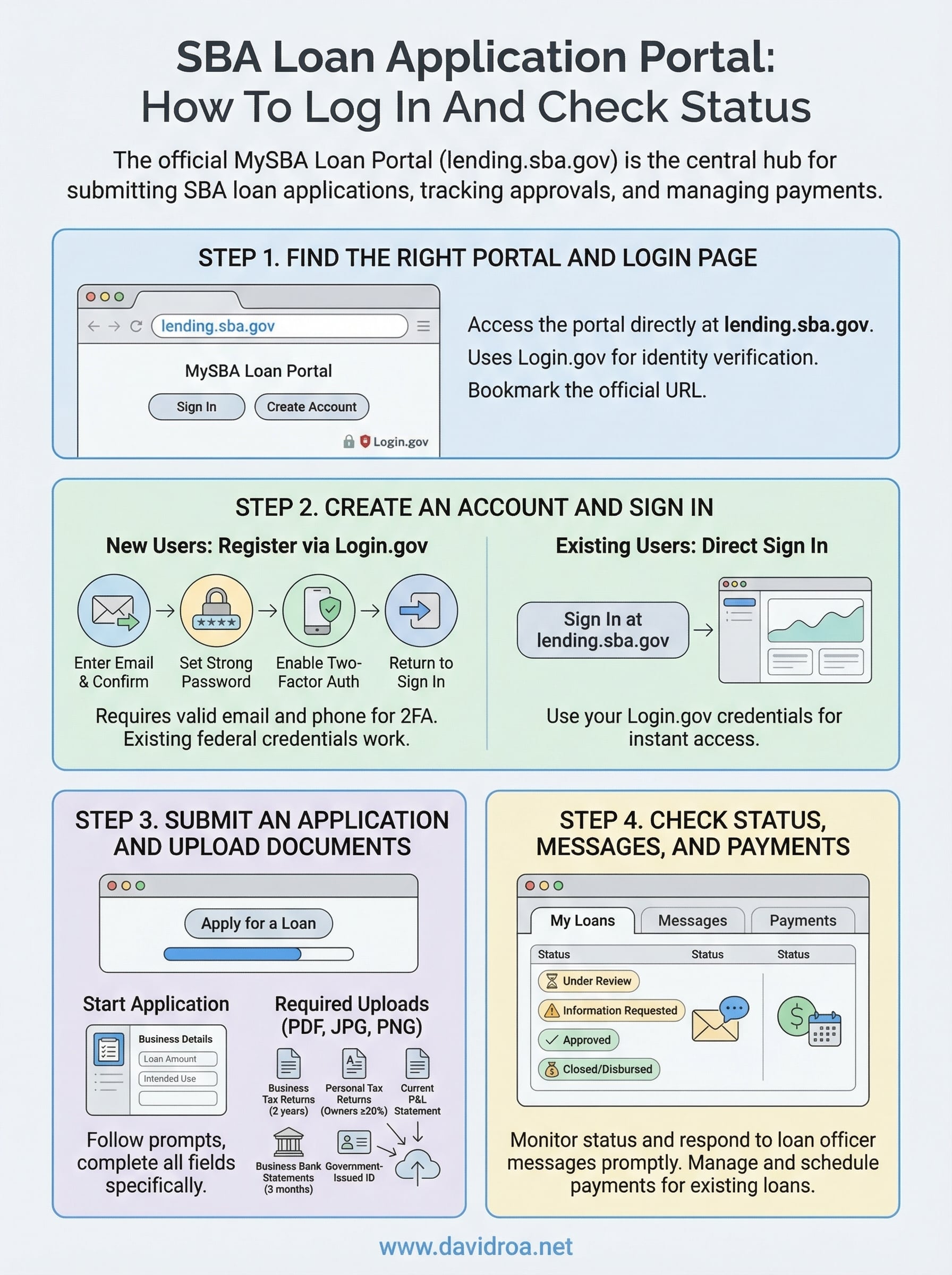
Before you enter any credentials, you need to confirm you're starting at the correct URL. The official SBA loan application portal is located at lending.sba.gov. Type this address directly into your browser rather than searching for it, since search results can surface outdated links or pages that look similar but won't connect to your actual loan account. Bookmarking the URL now prevents this problem entirely.
Bookmark lending.sba.gov now so you always return to the right login page without relying on a search.
What the login page looks like
When you land on lending.sba.gov, you'll see a MySBA Loan Portal header with two clear options: sign in or create a new account. The page uses Login.gov for identity verification, which is the same federal authentication system used across multiple U.S. government platforms. If you already have a Login.gov account from another federal service, you can use those same credentials here without registering again.
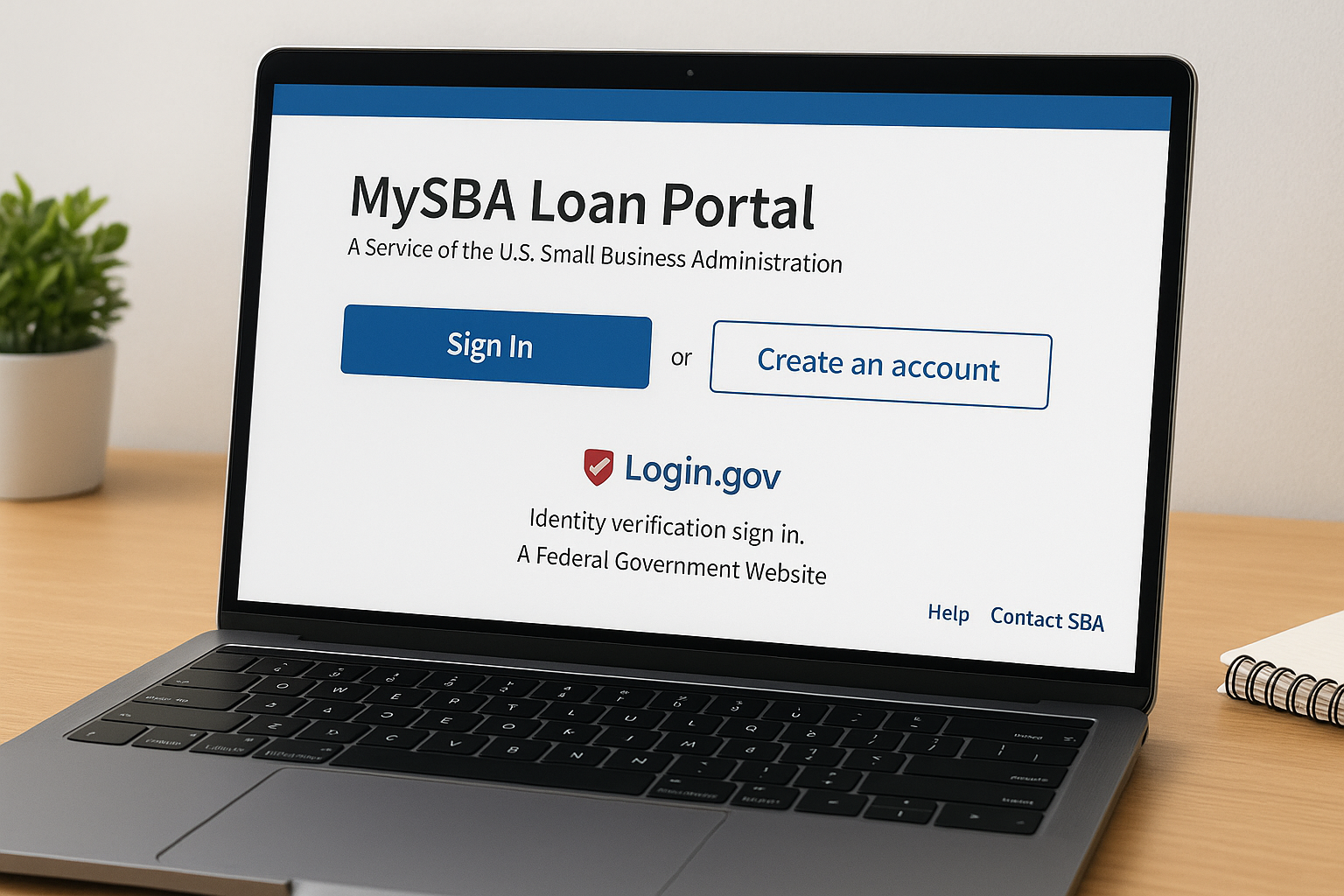
The portal runs in standard desktop and mobile browsers without any required downloads. You'll also notice a help section in the upper navigation if you run into login issues, and a direct option to contact the SBA if your account access is blocked or you've forgotten your registered email address.
Step 2. Create an account and sign in
The MySBA Loan Portal uses Login.gov for authentication, so your first task is setting up a Login.gov account if you don't already have one. Login.gov is the same federal identity system used by agencies like the IRS and SSA, so your existing credentials carry over if you've registered there before.
How to register a new account
Go to login.gov and select "Create an account." You'll need a valid email address and a phone number for two-factor authentication. Once verified, return to lending.sba.gov and click "Sign In." The portal redirects you through Login.gov, and after authentication, you land inside your SBA loan application portal dashboard ready to proceed.
Follow these steps in order:
- Visit login.gov and click "Create an account"
- Enter your email and confirm it via the link sent to your inbox
- Set a strong password
- Enable two-factor authentication using your phone number or an authenticator app
- Return to lending.sba.gov and click "Sign In"
Save your Login.gov email and password in a secure location before proceeding, since account recovery requires additional identity verification steps that slow down your timeline.
Signing in if you already have an account
If you've logged in before, go directly to lending.sba.gov and click "Sign In." Enter your Login.gov credentials and complete the two-factor prompt. You'll reach your dashboard within seconds.
Step 3. Submit an application and upload documents
Once you're inside the SBA loan application portal dashboard, look for the option to start a new application. The portal routes you through a structured form where you enter business details, requested loan amount, and intended use of funds before moving to the document upload stage.
How to start a new application
Select "Apply for a Loan" from your dashboard and follow the on-screen prompts. Each screen focuses on a specific section, so complete every field before moving forward to avoid errors that delay your submission. The portal saves your progress automatically, so you can return and finish if you need to gather additional information.
Do not leave the loan purpose field vague. Specific language like "equipment purchase for restaurant expansion" moves your application faster than generic descriptions.
Documents you need to upload
The portal accepts PDF, JPG, and PNG files. Prepare the following before you begin:
- Business tax returns for the past two years
- Personal tax returns for all owners with 20% or more ownership
- Current profit and loss statement
- Business bank statements (last three months)
- Government-issued ID for each owner
Upload each document into the correct labeled category inside the portal to keep your file review on schedule.
Step 4. Check status, messages, and payments
After submitting your application, the SBA loan application portal dashboard becomes your main tool for tracking progress. From the dashboard, locate the "My Loans" section, which displays every application tied to your account along with its current status label.
How to read your application status
Status labels tell you exactly where your file sits in the review process. The most common labels you'll encounter are:
- Under Review: SBA staff are actively evaluating your application
- Information Requested: You need to respond or upload additional documents
- Approved: Your loan has cleared underwriting
- Closed/Disbursed: Funds have been released to your account
Check your portal messages every time your status updates, since SBA loan officers often leave specific instructions inside the messaging center that do not trigger email notifications.
How to send messages and make payments
The Messages tab inside the portal connects you directly to your assigned loan officer. Use it to respond to document requests or ask clarifying questions promptly, since slow responses are one of the most common reasons applications stall mid-review. For existing SBA loans, the Payments section lets you schedule one-time or recurring payments, review your outstanding balance, and download payment history for your records.
Next Steps
Now you know how to register, log in, submit an application, and track your status inside the SBA loan application portal. The portal itself is straightforward once you know where each function lives, but the loan approval process depends on more than a clean submission. Every section of your application needs to be accurate and complete before you hit submit.
Strong SBA applications require accurate financial documents, a clear loan purpose, and fast responses to any information requests from your loan officer. Missing one of those elements is the most common reason files sit in limbo for weeks longer than necessary. Responding to document requests within 24 hours keeps your timeline on track.
If you're preparing an SBA 7(a) or 504 loan application and want guidance from someone who has helped business owners secure over 150 million dollars in financing, reach out today. Work with an SBA lending specialist at David Roa to get your application structured correctly from the start and move through approval without unnecessary delays.
